Showing posts with label Masai Mara. Show all posts

Wednesday, November 21, 2012

Aperture: how to use GIMP as external editor [Tutorial]


I don't like very much the Black & White conversion tools available in Aperture 3. I tried Silver Efex Pro by Nik Software and it's great, imho it's the best B&W conversion tool, but it's very expensive for me (I'm not a PRO).


Since you can easily edit your images with an external editor and save them back in Aperture, I usually use the free and open source GIMP for editing my B&W photos.
By the way, we finally have a native version of GIMP for MAC OS X, no more Apple‘s X11 needed. You can download the version you need (Lion, Mountain Lion...) from this useful page: GIMP on OS X - Downloads, open the .dmg file and drag GIMP application icon to your Application folder.

In order to set GIMP as external editor open the Aperture "Prefereces..." panel and choose the "Export" tab.

Use the "Choose..." button to select GIMP.

GIMP can read the 16 bit TIFF files, but will convert them to the 8 bit internal format, so you can choose "TIFF (8-bit)" or "PSD (8-bit)" as file format. At least not until GIMP 3.0 arrives with full support for 16 bit depth editing.

Note: if you select TIFF file format you will get this annoying warning message "wrong data type 7 for "RichTIFFIPTC"; tag ignored" every time. I was not able to avoid it so I chose PSD file format.

Now that everything is set, choose an image from your Aperture Library (I miss Kenya and the Masai Mara NP, so I chose a Zebra image I shot there last year) and from the right-click (or control-click) menu choose "Edit With Gimp..."


The editing part will not be covered here, since I'm not an expert. So when you're done editing, or when you want to save back to Aperture, the trick is to press cmd - E (or "Export" from the "File" menu) and not cmd - S (or "Save" from the "File" menu). The first time you'll need to choose the TIFF file created by Aperture (the folder will be already selected, so no worries).


You can still use cmd - S to save, but this command will save an XCF file, that is the native image format of GIMP. You can do it if you need it later.

And this is the result of my editing (basically desaturation and increase of contrast using Curves tool) that I posted yesterday on Google+:


Useful Links

GIMP on OS X Goes Native
GIMP on OS X - Downloads

Friday, January 27, 2012

Wildlife Photography by Uwe Skrzypczak: a "must have" book


Book cover
Last summer I made a beautiful trip to Kenya: being on safari in Samburu NP, Lake Nakuru NP and Masai Mara NR was for sure the best photographic experience for me and boosted my love for wildlife photography!

When I came back, I could enjoy the rise of photographers on Google+. Browsing trough posts, I found some beautiful photos of the Serengeti / Mara Ecosystem by +Uwe Skrzypczak. I immediately added him to my circle and started following his work: he is a Wildlife Conservationist, an amazing photographer and a book writer! You can find more info about his work on his website www.serengeti-wildlife.com.

One day he posted the description of his book "Wildlife Photography: On Safari with your DSLR: Equipment, Techniques, Workflow" and it looked like the book I needed to improve my wildlife photo skills.

The first thing I did when I got the book was to browse all the amazing photos and I noticed that every single shot had its own description with camera, lens, ISO, aperture, shutter speed and auto-focus settings!
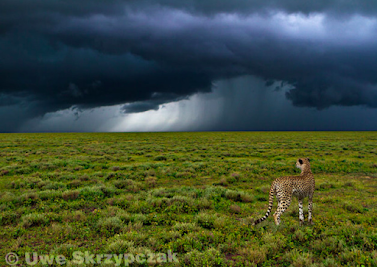
Thunderstorms in the Serengeti © Uwe Skrzypczak


The book is divided into 9 chapters: the first five are dedicated to Equipment, Shooting Techniques, Image Composition, Planning Your Trip and The Light in East Africa. This is the most technical part of the book and covers arguments related to general wildlife, not only African wildlife.

I found a lot of useful tips in these chapters, but the main things I've learned are:

- If you know the places and the behaviour of the subjects you'll have better chances to shoot better photos;

- Always check the camera light histogram and not only the image preview of the camera live viewer, in order to understand if the photo was correctly exposed.


Chapters 6 through 9 describe the main regions of the Serengeti/Mara Ecosystem, the behaviour and the migratory trends of the animals that live there! I really enjoyed this part. Reading it made me want to come back to the Masai Mara, where I've been in august, and going also to the The Ngorongoro Crater, The Ngorongoro Conservation Area and the Serengeti, that will be new to me, to observe the places and the animals again with a better knowledge!
On the track of the wildebeest...or a short look back to paradise ... © 2011 Uwe Skrzypczak
My favorite chapter of the book was the last: That Elusive Cover Picture, or Camping in the Rain at the Mara River, in wich Uwe tells his adventures when he tried to take a cover photo of a male lion called "Pavarotti"! It's priceless!

You can find the english version of the book on Amazon for about 25 $! Totally woth it!

This is the book's promotinal video: